
 »
»
News Account Update Instructions
Open up Outlook Express
At the top of the window click on Tools then go down and click on Accounts. The accounts window should now be opened, and at the top of that window you should see a tab called Mail. Click on the Mail tab and listed below should be your mail accounts. Select you C-Zone account and click on the button called Properties.
- Here you should enter your Name and two lines below, your E-mail Address.
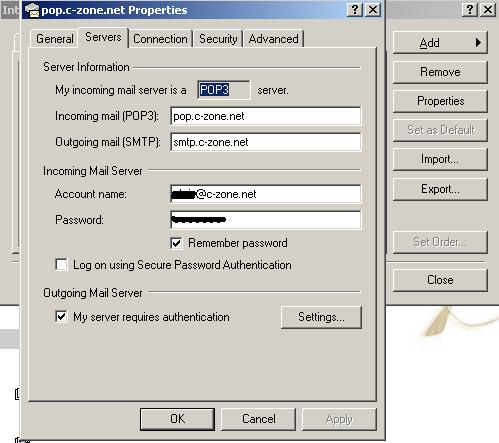
After you have finished with the General tab, click on the tab at the top called Server. At the top you should see Pop3. In the POP3 box enter pop.c-zone.net and in the SMTP box enter smtp.c-zone.net.
Now you can enter your username and password. The username and password you will need to enter are the same as your email account username and password. So where it says Account Name, in the field next to it type in your full email address including the @c-zone.net
Once you have filled in the Account Name and Password fields, at the bottom click OK.
Make sure "My Server Requires Authentication" is checked. Click apply then ok.
At anytime during this process you experience problems please call our support number, 1-800-500-3495, and we will be happy to help you make these changes.